
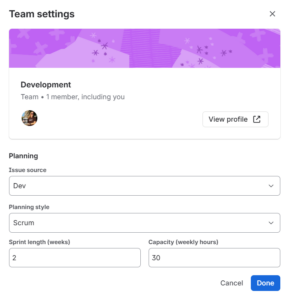
Capacity is the total amount of work a team can complete in a sprint, iteration, or time-period. But if calculated incorrectly, it sets teams up for failure.
If you calculate team capacity using the number of team members times the number of work hours, you’re likely to overcommit, miss deadlines, and overwork team members.
Instead, the calculation should include a reasonable number of productive hours, minus any absences, support work, and additional commitments. Also consider including a small buffer for unplanned and unexpected issues. Here’s how I calculate capacity for my teams.
Step 1: Calculate gross capacity
Calculate the number of team members, times the number of days in a sprint, times the number of productive hours in a day.
Determining Productive Hours
The workday may be 8 hours, but part of that time is lost to activities like administrative work, answering emails, attending daily stand-up meetings, and submitting timecards. There are often interruptions, context switching, coffee breaks, and little things that take focus away from a user’s primary work.
If the workday is 8 hours, organizations often use 6 hours or less in capacity calculations. If the team has 5 people that work work in 2-week sprints, the calculation is 5 team members, times 10 days in a sprint, times 6 productive hours in a day. That makes the starting gross capacity 300 hours.
Sample calculation
- 5 team members x 10 days in a sprint x 6 productive hours a day
Total = 300 hours
Step 2: Subtract absences, support work, and known commitments
Now that we have a gross number of hours, subtract any planned absences like holidays, vacation days, and scheduled training. If team members are part of multiple teams or provide production support, subtract that time too.
As an example, we have one team member on vacation for one week, another team member helping another team for half of the time, and another team member providing production support for two hours a week.
We need to reduce our gross total of 300 hours by 30 hours for vacation days, 30 hours for helping another team, and 4 hours for production support. That gives us a new and more realistic total.
Sample calculation
- 1 team member on vacation for 5 days (minus 30 hours)
- 1 team member helping another team 50% of the time (minus 30 hours)
- 1 team member providing production support for 2 hours per week (minus 4 hours)
New total = 236 hours
Step 3: Consider team composition
Do you have new or junior team members? You may want to subtract additional hours while they get comfortable with their duties and ramp up productivity. For example, subtract X hours in sprints 1 and 2 for new team members and Y hours in sprints 3 and 4. And then return to normal hours in sprint 5 when the user feels more comfortable in their environment.
New team members
- Subtract X hours in sprints 1 and 2
- Subtract Y hours in sprints 3 and 4
- Return to normal hours in sprint 5
Another way to handle different experience levels is to subtract hours for junior members and add hours for senior members.
Junior and senior team members
- Subtract X hours for junior team members
- Add Y hours for senior team members
E.g., Less efficient team members at 0.7x and more efficient team members at 1.3x.
Also consider the specific skills required to complete work. For example, front end developers, database engineers, and QA testers all contribute different types of work that can influence capacity. If a task takes an hour to code, it might only take a half hour to test, or vice versa. If there are 100 hours of testing work but only 60 hours of QA availability, the sprint cannot be successful.
Step 4: Consider unplanned work
Finally, don’t forget to consider unplanned sick days, system outages, emergencies, and other dependencies that reduce capacity. Consider creating a buffer by further reducing capacity by 10-20% for unplanned or unexpected issues.
Common Capacity Killers
Organizations should commit to reducing the following:
- Waiting on other teams
- Unstable or unavailable environments
- External dependencies (E.g., vendors, systems)
- Approvals and process overhead
- Shifting goals and company priorities
- Pushing incomplete work from sprint to sprint
- And more
A Word About Estimation
In addition to realistic capacity calculations, work needs to be estimated correctly too. Don’t forget to include the following standard development and testing activities:
- Understanding requirements and acceptance criteria
- Coding and reviewing code
- Writing and executing test cases
- Creating and maintaining automated test cases
- QA, UAT, integration, smoke, unit, and other testing
- Fixing and retesting bugs and defects
- Writing documentation
- Addressing technical debt and refactoring code
- Research, troubleshooting, and investigating bugs and spikes
- Planning, refining requirements, and estimating future work
- Conducting retrospectives
- Preparing for audits
- Completing all items in a team’s “Definition of Done” checklist
- And more