
I originally dug into the upcoming data contribution changes for a specific consulting client. Because the findings affect many Atlassian environments, I’m sharing what I learned with fellow Jira and Confluence admins. Here’s what you need to know and which actions to take now.
Atlassian already uses customer data to support and improve an individual organization’s experience. But soon, they are expanding how customer data is used to improve their apps and AI capabilities across all customers. Application administrators should treat this as a data governance change, not a passive product update or AI feature announcement. Contribution controls touch org-wide configuration, metadata, and user created content. Your immediate task is to review your data contribution settings and align them with your internal security, compliance, privacy, legal, AI-governance, and data-residency requirements.
What is changing?
Starting August 17, 2026, Atlassian will start training its AI models on data in your apps. You can opt out of contributing “in-app” data but not “metadata.”
- Metadata includes de-identified and aggregated attributes and common patterns.
- Example attributes: A Jira work item’s sanitized title, story point value, and due date. Atlassian might classify a Jira work task to “create a new product” as a “sales work item.” Further, it might read the numbers in the work item and know that it has a story point value of “8” and has a sprint end date of “12/31/26”.
- Example patterns: Common phrases in search queries and results, in Rovo prompts and responses, and in configuration values (like an option in a Jira custom multi-select field.)
- Because this data is de-identified, it is NOT subject to any data residency restrictions you’ve set.
- In-app data includes de-identified user created content like titles, descriptions, comments, custom status names, and custom workflow names.
- For example: Atlassian might read the name of the “sales work item’s” workflow.
Atlassian states that direct identifiers such as names and email addresses are removed before contributed data is used, and that the data is aggregated. Content does not include information that reveals health, location, workforce, financial data, or information that identifies an individual.
Data collection settings
The data collection settings initially apply to Jira, Confluence, Jira Service Management, and Atlassian Platform apps like Rovo, Home, Teams, Projects, Assets, Goals, Analytics, and Administration. The controls are managed at the Atlassian organization level, not per application, space, or user.
Default settings
| Highest active Cloud plan | Metadata setting | In-app data setting | Admin control |
| Free or Standard | Always contributed | On by default | In-app data can be turned off; metadata cannot |
| Premium | Always contributed | Off by default | In-app data can be turned on or off; metadata cannot |
| Enterprise | On by default | Off by default | Both settings are configurable |
Important tips:
- The highest active subscription within an Atlassian organization determines the defaults. For example, if an organization has Jira Cloud Premium and Confluence Cloud Standard, for data contribution purposes, the settings are at the “Premium” level.
- The only way to disable metadata contribution is to upgrade one or more apps to Cloud Enterprise.
- If you have multiple Atlassian organizations, you should review them separately.
- While there’s one overall in-app collection setting, you can also include or exclude selected data like apps, spaces, or connectors. Read more
Managing settings
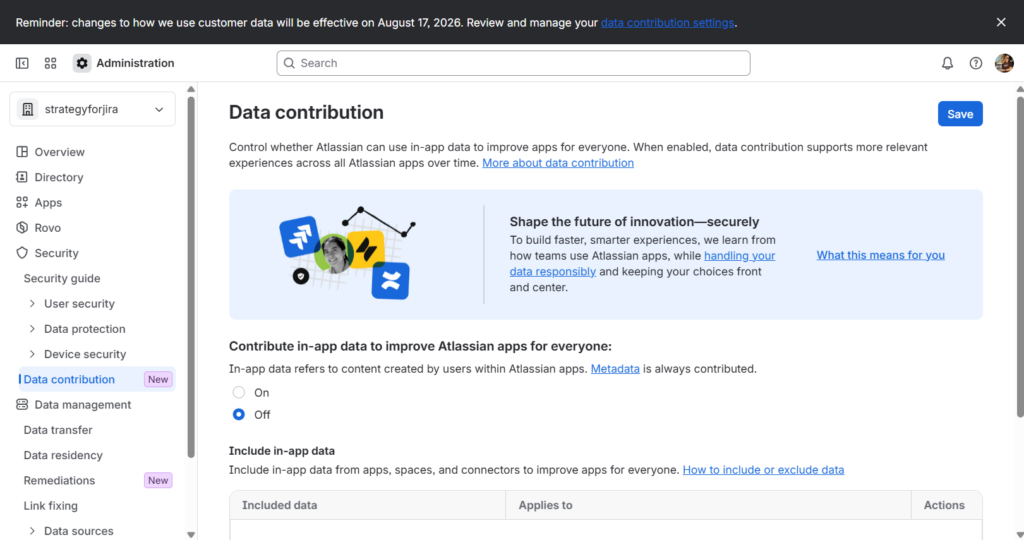
To turn data collection settings on or off, visit: admin.atlassian.com > Security > Data Contribution.
What if I miss the deadline?
Atlassian will start data collection on August 17, 2026. You can turn data collection on or off now, after the deadline, or any time in the future. If you opt out after the deadline, Atlassian will remove in-app data within 30 days, remove content attributes within 90 days, retrain any models previously trained on that data, and stop collecting new data. Read more Otherwise, de-identified and aggregated data may be retained for up to seven years. Additionally, Atlassian states that they do not sell customer metadata or in-app data.
Tasks for Application Admins
Right now:
- Inventory your Atlassian organizations
Record the sites, eligible apps, highest active plan, any trials, and relevant connectors for each organization. - Review and document current data contribution settings
Visit:admin.atlassian.com > Security > Data Contribution - Apply your governance decision
Opt in or opt out depending on your organization’s needs and your Cloud plan capabilities. Tip: After making changes, don’t forget to click the save button at the top right of the Data contribution page. - Document your changes
Capture the approver, date, plan level, settings selected, exceptions, and review cadence. Notify security, compliance, privacy, legal, records-management, and AI-governance stakeholders as appropriate.
Additionally:
While we’re here, now’s a great time to review your data residency settings which determine what country your information is hosted in. Residency is configured at the app level – it can’t be set at the individual space, client, or user level. Atlassian will respect residency settings for data contribution of user created in-app content. Metadata is NOT subject to data residency settings, however.
Visit: admin.atlassian.com > Data management > Data residency
Finally, don’t forget to consider the future and routinely check for any changes. For example:
- Adding Future Atlassian Apps – If you add additional Atlassian products in the future, they will be subject to the current data contribution settings. If data contribution is on, Atlassian will begin using the metadata and in-app data from that app after 30 days.
- Marketplace Apps – Currently, Atlassian does not use data within Atlassian Marketplace apps.
- Excluded Atlassian Apps – At this time Atlassian only uses data from apps where in-app data collection can be disabled. Settings for apps like Bitbucket, Trello, and Loom may become available in the future. Further, Government Cloud, Isolated Cloud, and organizations with HIPAA compliance configured are excluded. Atlassian says “for excluded organizations, data contribution will be turned off by default, and you won’t have the option to turn it on.”
Sources and Resources
- https://www.atlassian.com/trust/ai/data-contribution/faqs
- https://support.atlassian.com/security-and-access-policies/docs/understand-data-contribution/
- https://support.atlassian.com/security-and-access-policies/docs/what-types-of-data-does-my-organization-contribute/
- https://www.atlassian.com/trust/ai
- https://www.atlassian.com/trust/ai/data-contribution
- https://support.atlassian.com/security-and-access-policies/docs/data-contribution-settings-availability/