Tip Relates To
| Application Type | Jira, Jira Service Management |
| Deployment Type | Cloud, Data Center |
| Audience | End Users |
| Category | Work Items |
Tip
There are many ways to create work items in Jira. Here are all the options, ranked from the best and easiest methods to the worst or most complex:
- Click the Create button at the top of any Jira page.
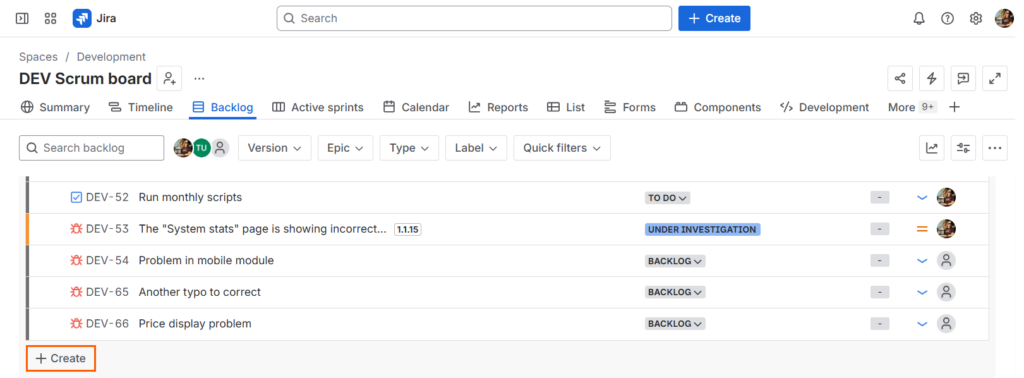
- Use additional Create buttons on strategic Jira pages. (Ex: At the bottom of the Backlog page, at the bottom of a list, etc. Pictured above.)
- Type the “c” keyboard shortcut.
- Clone an existing work item.
- Use built-in automation flows.
- Use built-in forms.
- Use the “work item collector” feature.
- Create from other applications. (E.g., Confluence)
- Use functions in third-party apps.
- Use functions in connected apps. (E.g., Microsoft Teams)
- Import from a CSV file.
- Use the REST API.
- Use the “incoming mail handler” feature to create via email.
Bonus method: Use Rovo or artificial intelligence. I’m not sure where this method should go in the ranking, however. I’ve had good results and bad results trying it.
Explanation
The easiest way to create a new item is by clicking the Create button at the top of any Jira page. First, select the proper Jira space. Type a space’s long name (Ex: Development), its short key (Ex: DEV), or scroll through the drop-down list. After you’ve selected a space, select the type of item using the “Work Type” drop down menu. Each space has its own set of work types, based on the type of work done. Some Jira spaces have just one work type and some have many. After selecting a Space and Work type, complete the remaining form fields and click the form submission button. “Summary” is always a required field.
You can create work items using any of the other methods listed above. At a minimum, regardless of the entry method, Jira will need the space name, work type, and summary.
Resources
- Create a work item and a subtask – https://support.atlassian.com/jira-software-cloud/docs/create-a-work-item-and-a-subtask
- Use the work item collector – https://support.atlassian.com/jira-cloud-administration/docs/use-the-issue-collector
- Create a Jira ticket from a project brief (with Rovo) – https://www.atlassian.com/software/rovo/use-cases/create-a-jira-ticket