Tip Relates To
| Application Type | Jira, Jira Service Management, Confluence, and more |
| Deployment Type | Cloud |
| Audience | Application Administrators |
| Category | Billing, Apps, Third-party apps |
Tip
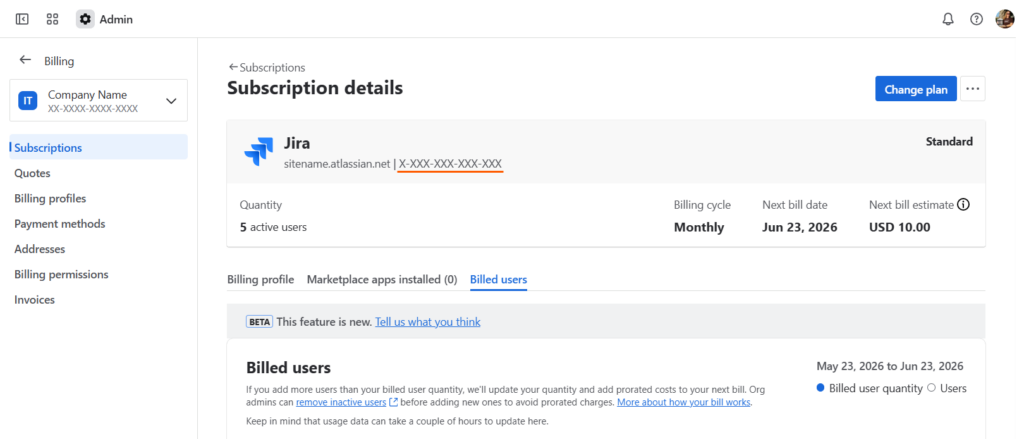
Looking for a product’s entitlement number? For Billing admins, visit: admin.atlassian.com and click the “Billing” link on the left sidebar. On the Billing page, locate the Jira product in the list. Then click the “Manage” button on the right. On the next page, the number will be next to the application’s URL in the format: X-XXX-XXX-XXX-XXX
Explanation
In Jira Cloud, the Entitlement Number is a unique identifier for a customer’s app subscription. This number was formerly called “SEN” or “Support Entitlement Number”. Sometimes this number is needed when requesting support or when working with third-party vendors or app providers.
To see this information, manage subscriptions, manage payment, and access invoices, you must have the Billing admin role. Organization admins and site admins have limited billing-related permissions.
You must have the Billing admin permission to access this information.
Resources
- How to find your Support Entitlement Number (SEN) – https://confluence.atlassian.com/support/how-to-find-your-support-entitlement-number-sen-229840018.html
- Understand billing administration – https://support.atlassian.com/subscriptions-and-billing/docs/understand-billing-administration/