Tip Relates To
| Application Type | Jira, Jira Service Management, Confluence, and more |
| Deployment Type | Cloud |
| Audience | Developers, Application Administrators |
| Category | Integrations, Apps Development |
Tip
Find your Atlassian Cloud Organization ID (“Org ID”) by visiting admin.atlassian.com and copying it from your browser’s address bar. The ID is the long alphanumeric string after “/o/”. For example: https://admin.atlassian.com/o/XXXXXXXX-XXXX-XXXX-XXXX-XXXXXXXXXXXX/overview
Explanation
An Org ID is a unique identifier for a set of Cloud sites and products. It’s primarily used when creating integrations, developing apps, and authenticating API requests. (There’s also a Cloud ID, which identifies a single application instance.)
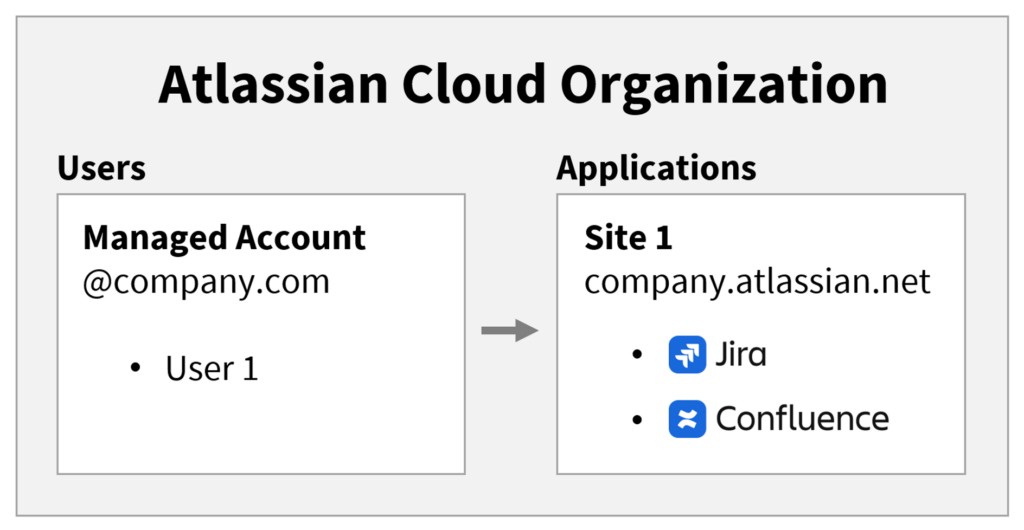
In its simplest form, a company has one Atlassian organization, containing one site, which holds one or more Atlassian products like Jira and Confluence. (Pictured above.) But some companies require multiple sites in their organization or even multiple organizations. A more complex model is often needed when there are different user types (Ex: internal vs external), different data residency requirements (Ex: local vs international), or different security needs (Ex: contains vs doesn’t contain sensitive information).
Resources
- What is an Atlassian organization? – https://support.atlassian.com/organization-administration/docs/what-is-an-atlassian-organization
- Retrieve my Atlassian Cloud Organization’s ID – https://confluence.atlassian.com/cloudkb/retrieve-my-atlassian-cloud-organization-s-id-1207189876.html
- Organizations REST API – https://developer.atlassian.com/cloud/admin/organization/rest/api-group-orgs/#api-v3-orgs-get