Tip Relates To
| Application Type | Jira |
| Deployment Type | Cloud, Data Center |
| Audience | End Users, Project Managers, Leadership |
| Category | Sprints |
Tip
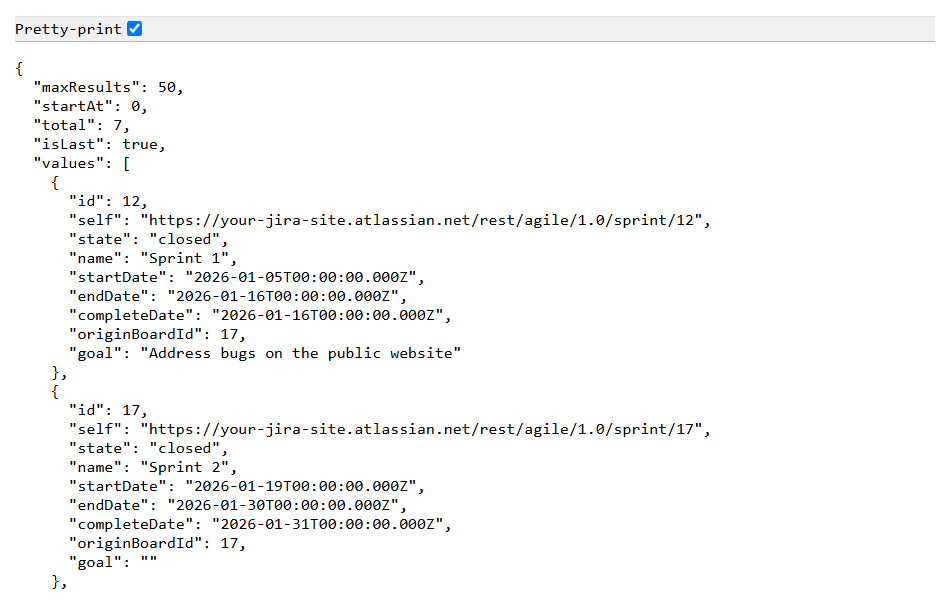
Looking for a list of sprints and sprint meta data in a Jira space? There’s an easy way to get it through the REST API – no coding or dev skills required!
Step 1: Visit a board in a Jira space and copy it’s unique ID in your browser’s address bar.
Step 2: Add the board ID to this URL:
https://your-jira-site.atlassian.net/rest/agile/3.0/board/board-id/sprint
Explanation
Are team members are constantly asking:
- How many sprints have we had this year?
- When does the next sprint start?
- When does the last sprint of the quarter end?
- Is sprint X still active?
- Which boards don’t have sprints created?
They can get some of this information from the “Active Sprints” page in a Jira space, but sometimes it’s easier to give them a simple URL to get a list of all sprint details in one place.
Bonus tip: In Chrome, click the “pretty print” checkbox at the top left to improve readability. (Pictured)
Resources
- Cloud documentation – https://developer.atlassian.com/cloud/jira/platform/rest
- Data Center documentation – https://developer.atlassian.com/server/jira/platform/rest/